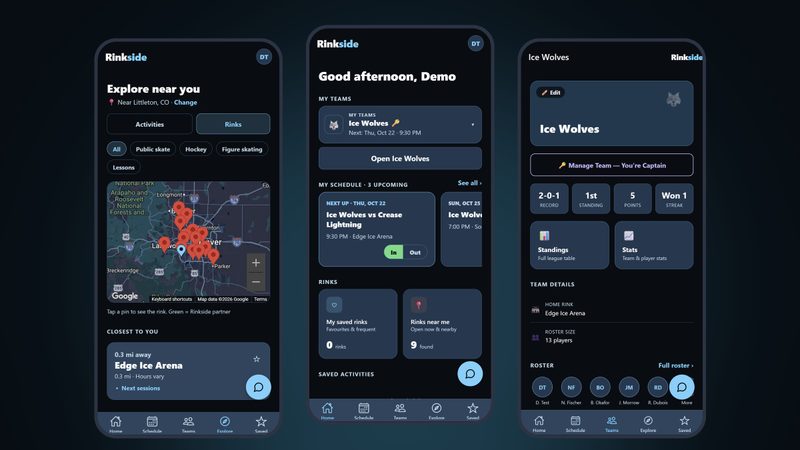
Find ice sessions near you and keep your team's schedule, RSVPs, and scores in one place. No more checking five rink websites, or waiting on a captain to retype the league schedule.
My role
Solo designer and founder. I did the research, UX, prototype, and product direction. I built the app with Claude Code.
I play adult league and drop-in hockey in Colorado. Finding ice time means checking a different website for every rink, logging in to see if there's room, and often still being told to call. I wanted one place where a skater can see every session they can actually book, right now.
The problems I set out to fix
You can't see what's available. Most rink systems hide open spots behind a login, or show them with no way to book.
There's no single source of truth. Rinks publish times that conflict with each other, then tell you to phone.
Casual skaters get left out. Drop-in is often members-only, and pricing assumes you're signing up for a season.
Team schedules depend on a volunteer. A captain retypes every ice time by hand, so games sit at "To be determined."
Problem statement
Adult recreational skaters need to see which sessions they can actually book right now, because every system I studied hides availability behind a login or shows it with no way to act on it.
Who it's for
Adult drop-in and league players, parents booking for kids, and casual skaters who just want to get on the ice.
Constraints
Solo project with no budget for paid tools or research participants.
A small research sample, from my own network.
No rink had signed on yet, so all rink data came from public listings.
Waivers and legal text need a lawyer, so the design leaves room for them instead of writing them.
02Research
What I wanted to learn
Is there a real need, and who has it?
How do people find out when they can skate, and how do they sign up?
Where does the booking journey break?
What do rinks need for this to work?
How I found out, and why
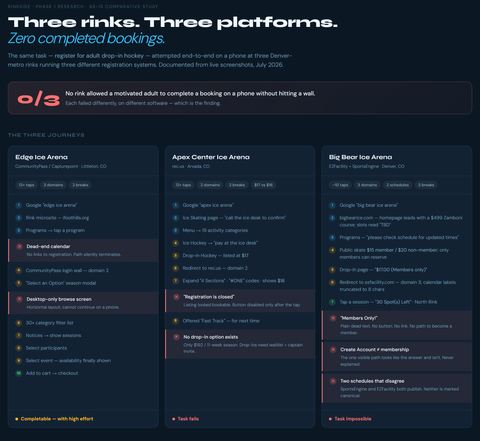
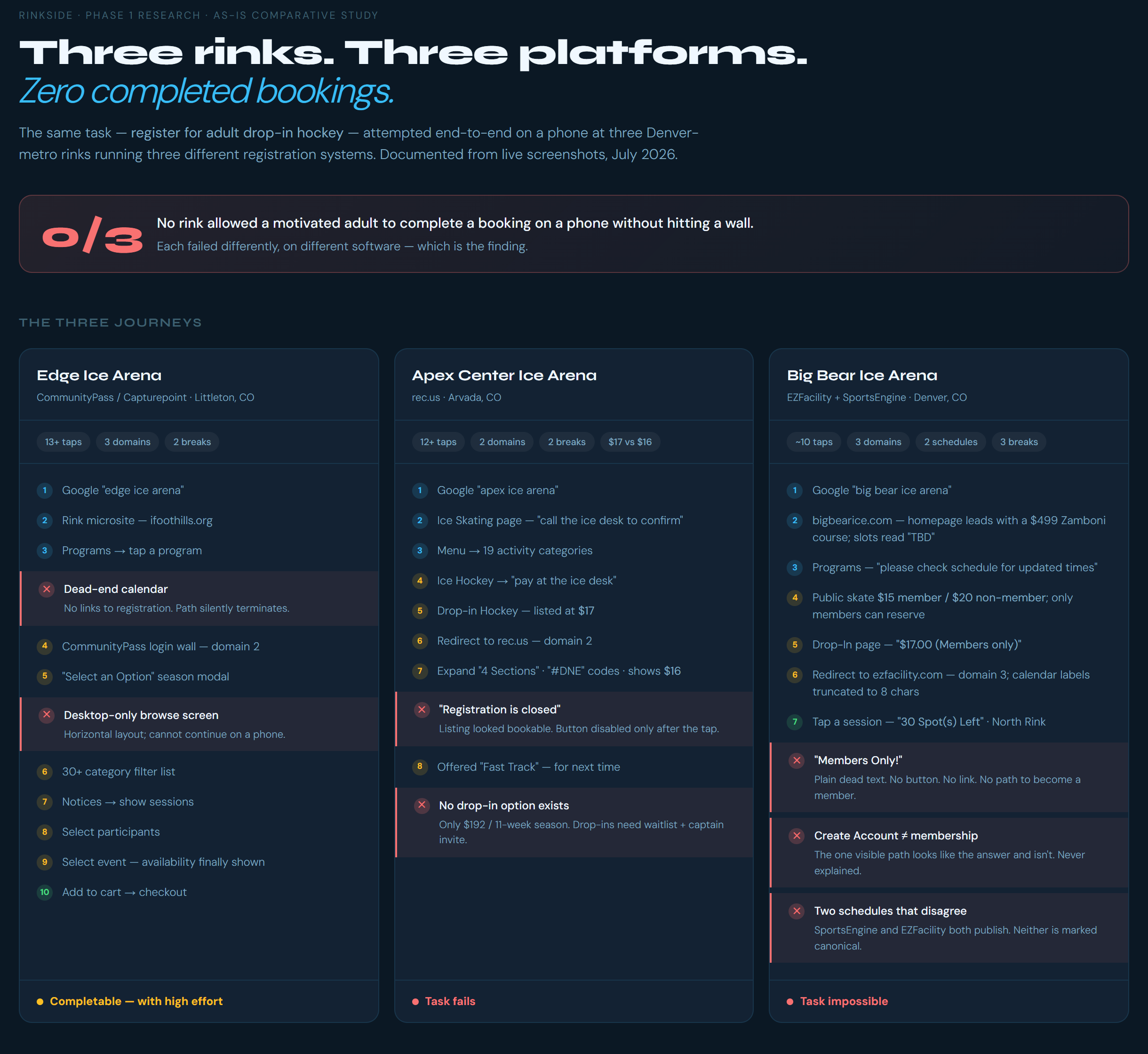
A hands-on study of real booking systems. I tried to book drop-in hockey on my phone at three Denver-area rinks, each on different software, and screenshotted every step. I wanted to see exactly where it breaks, not just hear about it.
Interviews with adult players, team captains, parents of youth skaters, and a casual skater, to hear the problem in their words.
A survey (8 responses) to check whether what I heard held up beyond the interviews.
I started with only my own experience as a player, and my early personas were guesses. I needed real data before designing anything. Everyone I interviewed or surveyed agreed to take part and answered voluntarily. Names and identifying details are left out here.
The as-is study: three rinks, three platforms, zero completed bookings on a phone. Open full size image
What hurt the most
Availability is hidden or useless. Booking friction scored 3.1 out of 5 in the survey, the highest of anything I asked about. At one rink, booking a single session took 13 taps. Half the players I surveyed (4 of 8) had driven to a rink and found the session full, cancelled, or different from what they expected.
The schedule depends on a volunteer. Captains retype ice times by hand, so games show "To be determined."
Parents are already bridging apps by hand, copying schedules from the official platform into a team app.
In their words
"It would be great if I could see all the availability for local rinks in one place, like when I want to get movie tickets."
Participant 2, adult league player
"Convenience with registration would supersede commute time."
Parent 1
"Parents sometimes just copy all scheduling info into BenchApp for ease of use and common ground."
Parent 3
"Almost didn't go — the sessions were full."
Casual skater
What the research told me
People want "movie tickets for ice." Four separate people described the same idea without being asked.
Friction scares off newcomers more than regulars. Committed players push through. First-timers give up. That makes it a growth problem, not just an annoyance.
Manual schedule entry is where teams fall apart.
Competitive audit
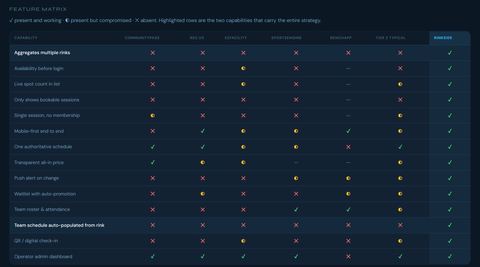
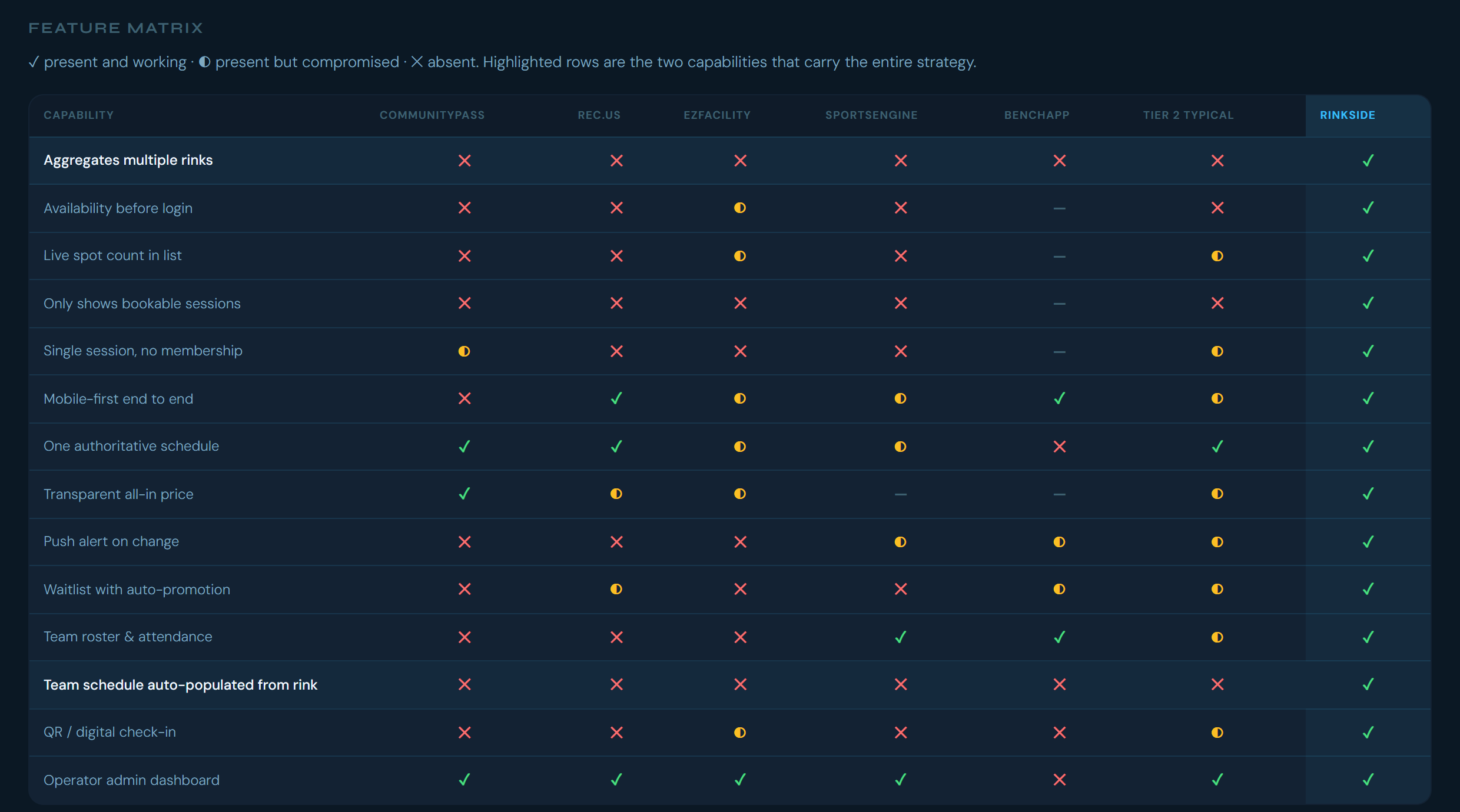
I compared the booking platforms rinks use (CommunityPass, rec.us, EZFacility, SportsEngine, DaySmart Dash), BenchApp for team coordination, and similar apps like Volo Sports.
None of them show sessions from more than one rink.
Even the best one shows sessions you can't book, including ones that have already ended.
No ice-specific app combines the official schedule with team attendance. Volo does, but only at its own venues.
Feature matrix. Everyone builds for the rink. Nobody builds for the skater. Open full size image
03Personas & journey map
Both personas are built from interviews. Their names and ages are made up. Their frustrations are real.
Easton, 31
Plays in a Tuesday-night adult league, plus drop-in stick & puck. Very comfortable with apps.
Goals
See his team's schedule and confirm he's coming, fast.
Find last-minute drop-in when he wants extra ice.
Not get surprised by a rink change or a Zamboni delay.
Frustrations
No way to know if a nearby drop-in has room without calling.
His captain types every game in by hand, so future games say "To be determined."
When the league changes a time, the team app still shows the old one.
Teammates don't say if they're in until the last minute.
In his words
"It would be great if I could see all the availability for local rinks in one place, like when I want to get movie tickets." (Participant 2)
Maria, 38
Works full time. Parent of one or two kids, ages 4–14, who skate at several rinks with different associations.
Goals
Sign the kids up without hunting across organizations.
Know right away if a session is full or cancelled.
Keep track of who's skating when.
Frustrations
Four or more separate organizations every season.
Registration sites crash when spots open.
Messages only reach one parent.
Entering the same info into multiple apps.
In her words
"Convenience with registration would supersede commute time."
The journey today
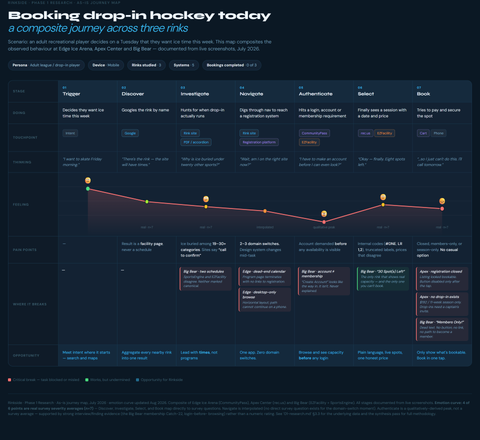
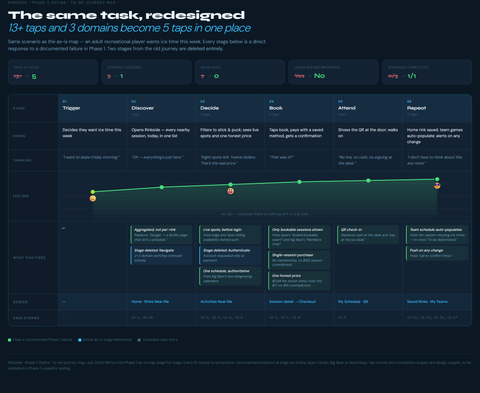
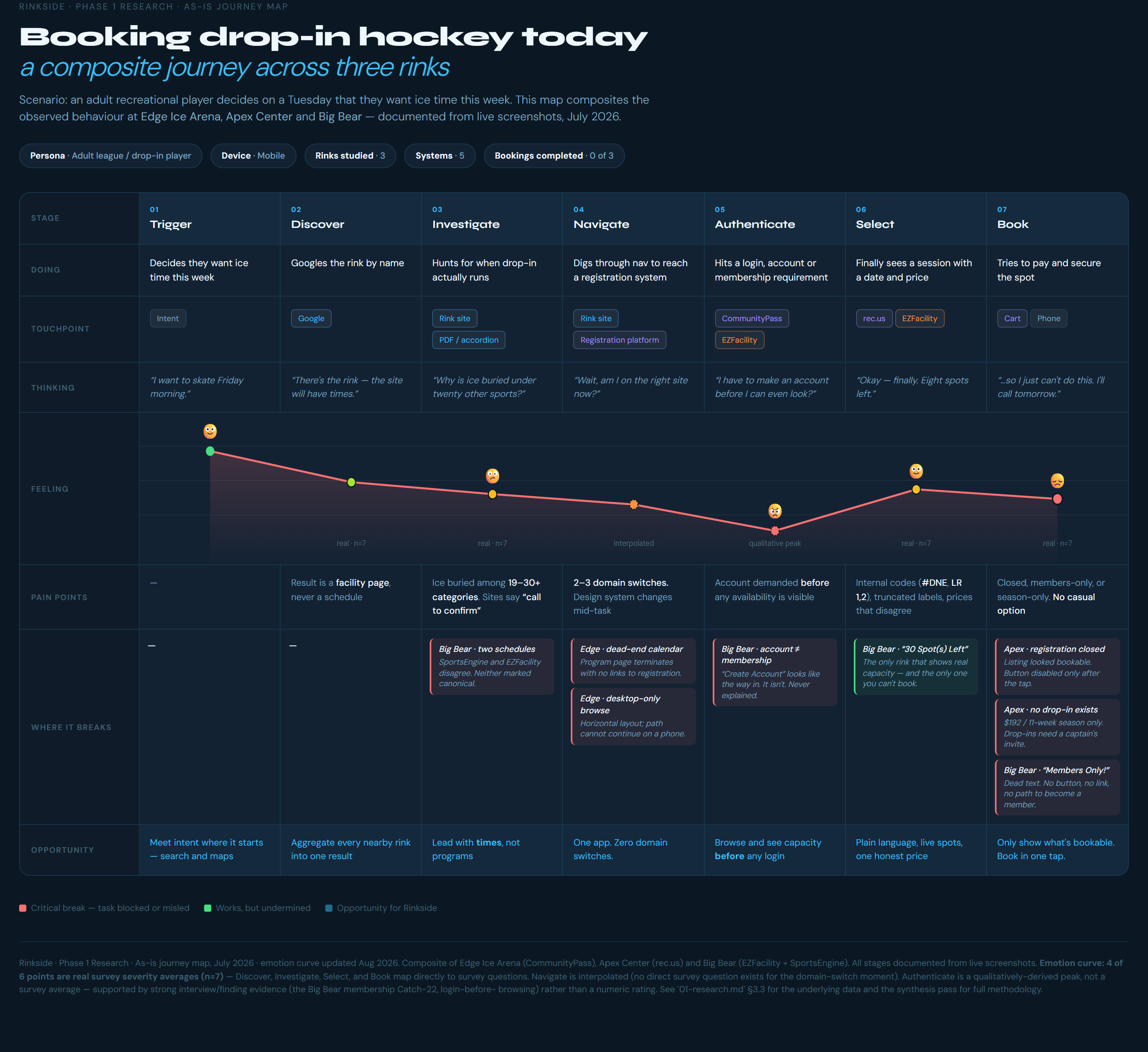
A Google search lands on a rink's homepage, not its schedule. Then a login wall, a dead end, and "call to confirm." Most people give up or pick up the phone.
As-is journey: 13+ taps and three different websites, with the lowest point at the login wall. Open full size image
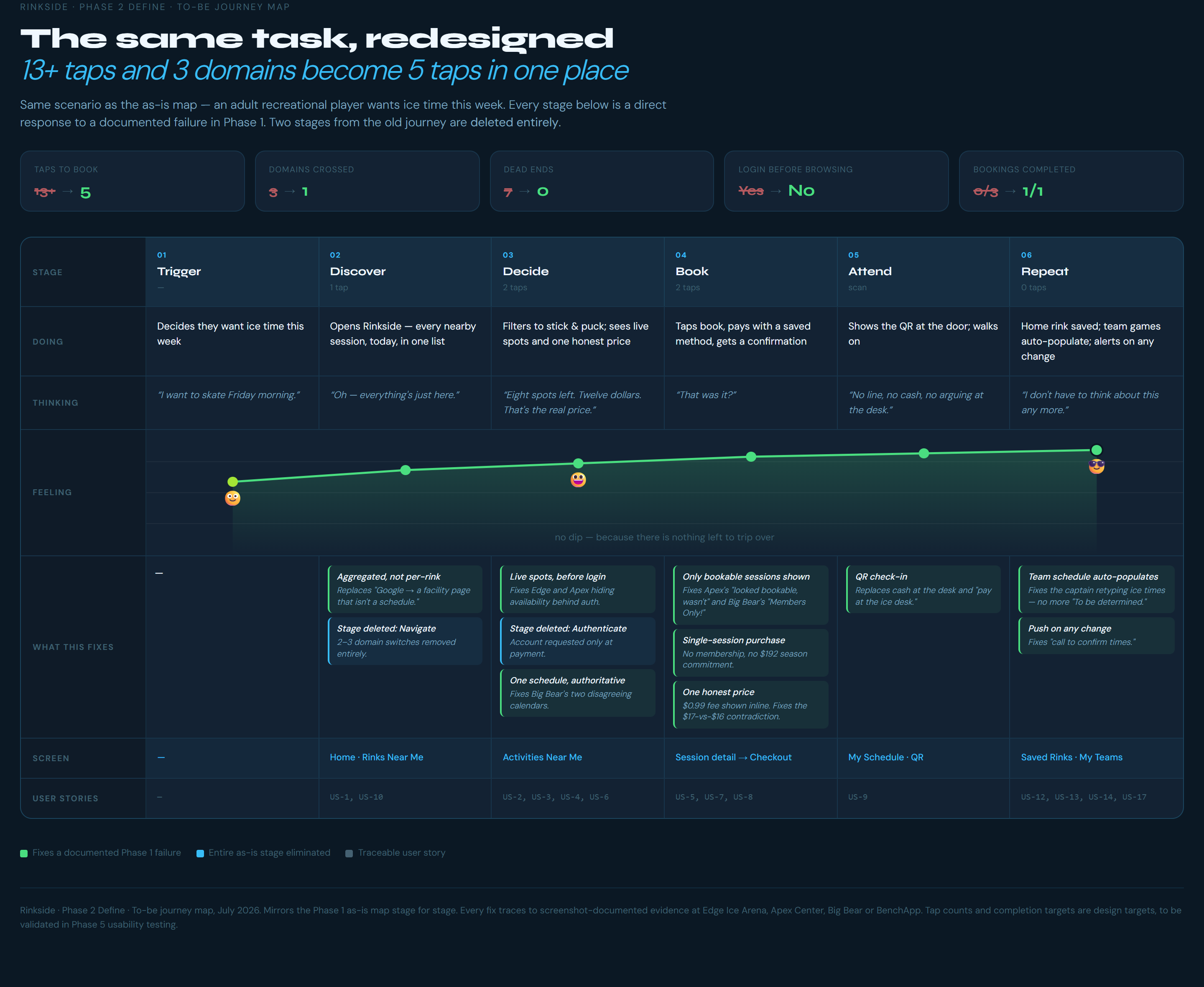
The journey I designed for
Open the app and see every nearby session today in one list, with live spot counts. Book in a few taps, no membership needed.
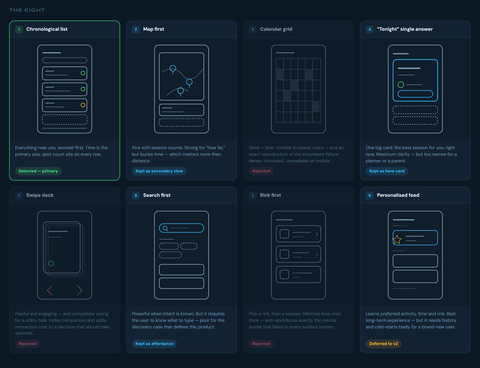
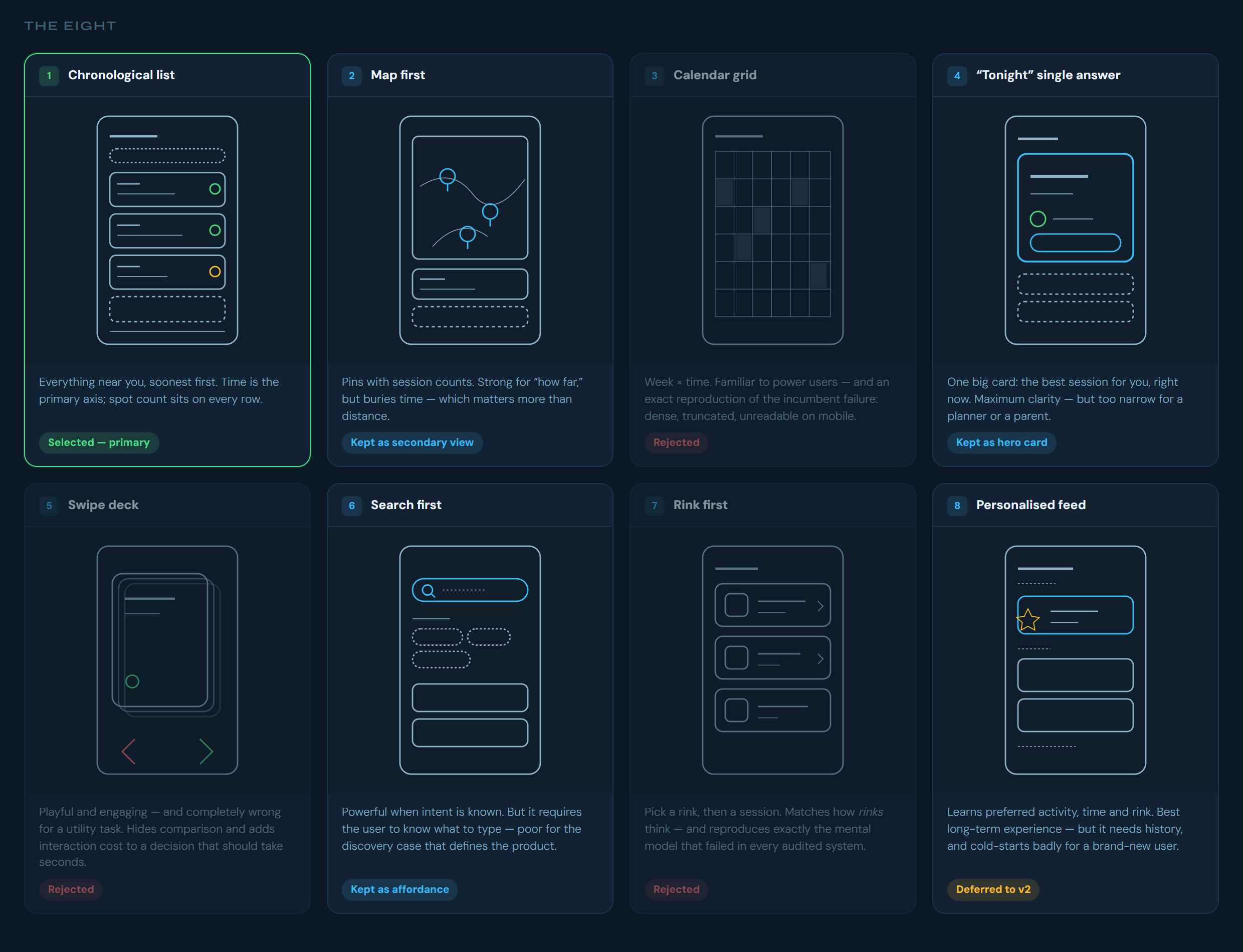
A chronological list of sessions as the backbone, with a "Tonight" card on top, a map you can switch to, and search always within reach. It answers the question directly, it's the easiest to scan, and it still works when a rink has only a few sessions listed.
What I dropped
Calendar grid. It's what the current systems do, and it's dense and hard to read on a phone.
Swipe deck. Fun, but wrong for a quick, practical task.
Rink first. It repeats the mental model that's already failing people.
Replacing BenchApp outright. Teams already like it for chat and polls. Asking a whole roster to switch apps is a big ask, so Rinkside works alongside it.
05Wireframes & prototype
How the app is organized
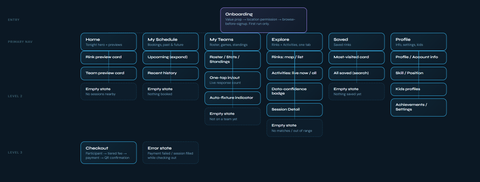
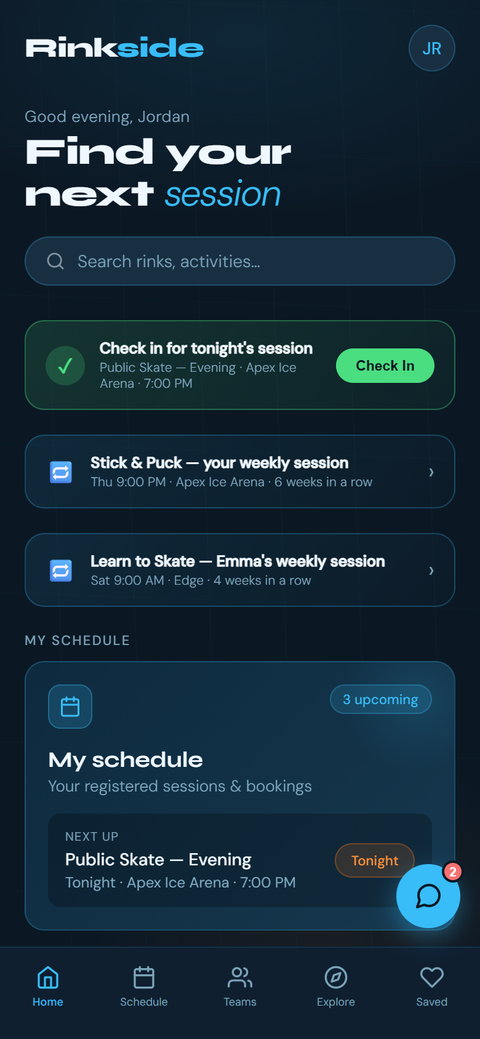
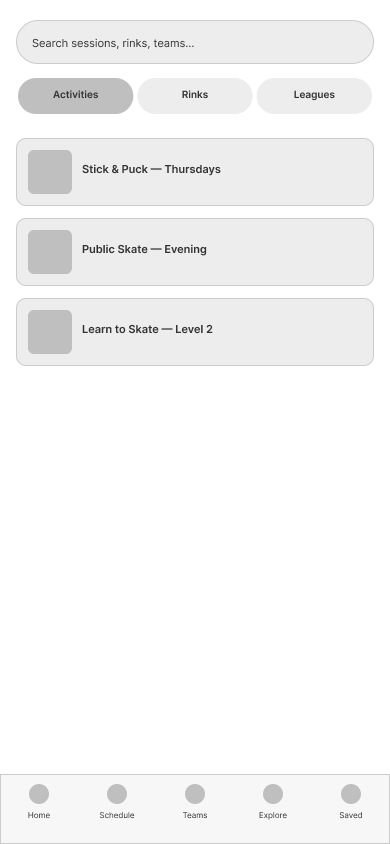
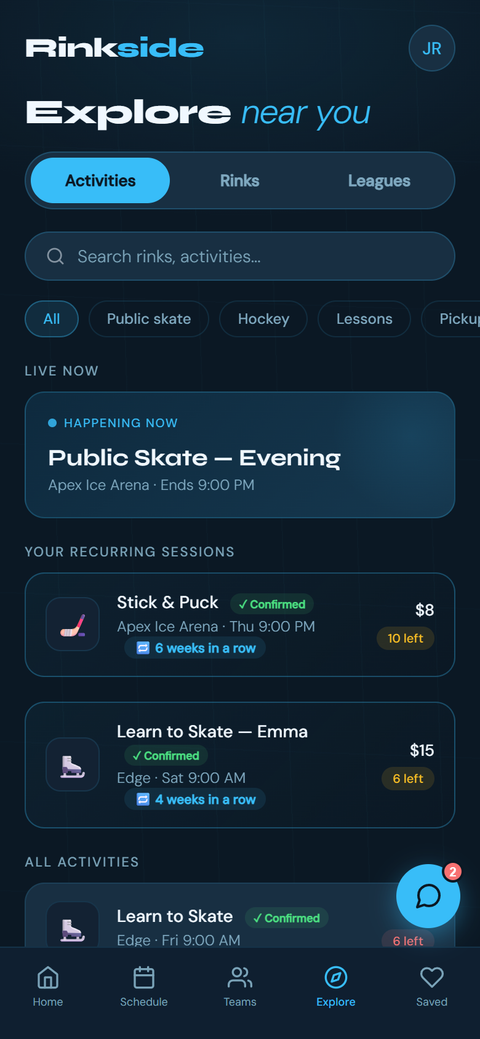
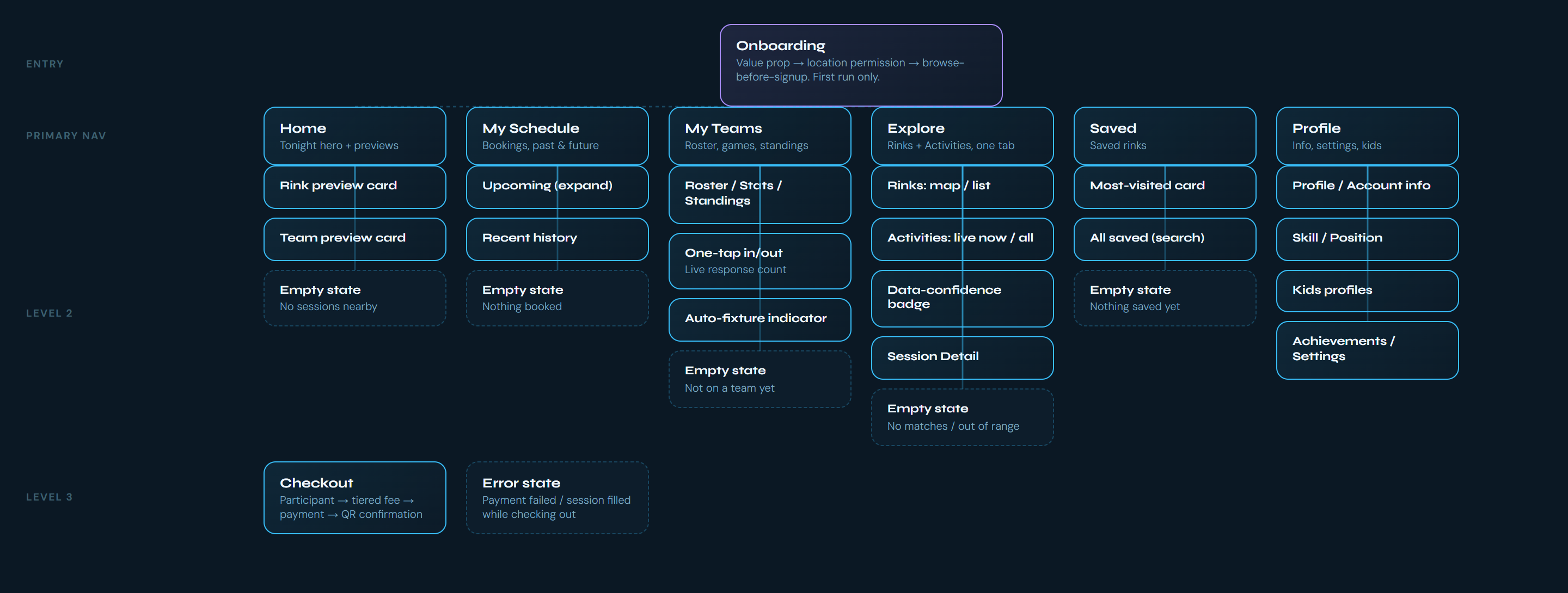
Six tabs: Home, My Schedule, My Teams, Explore, Saved, and Profile. Every screen follows the same order: one hero item, a scannable list, then filters. I merged "Rinks" and "Activities" into one Explore tab with a toggle, because research showed people getting lost between competing tabs.
I wireframed in Figma, then built the hi-fi prototype as clickable HTML so every screen could be wired together and tested on a real phone.
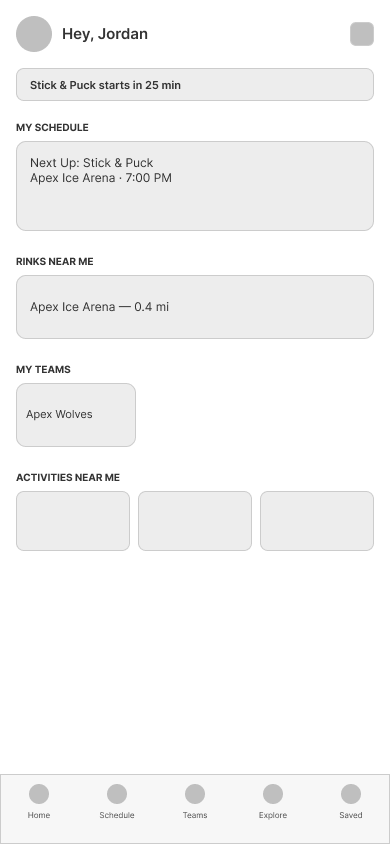
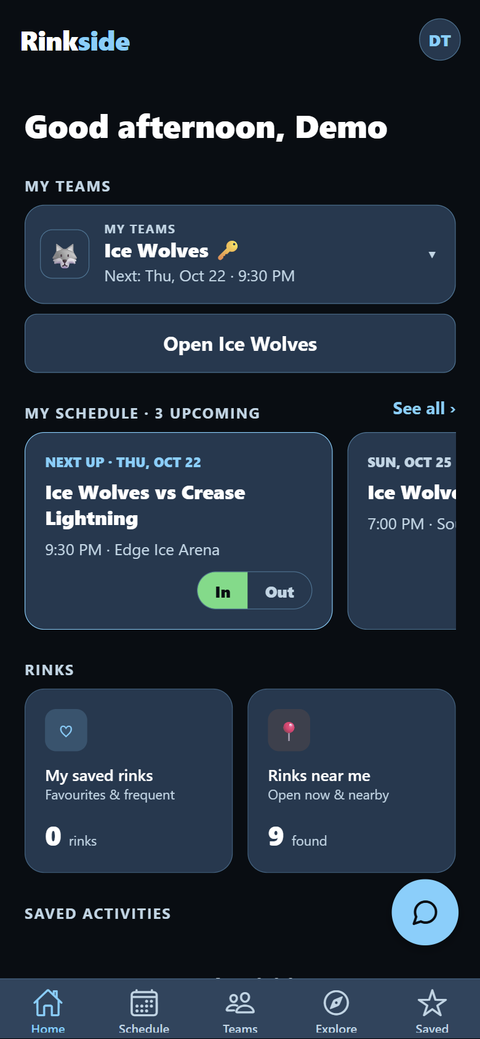
Home
Lo-fi wireframe
Hi-fi prototype
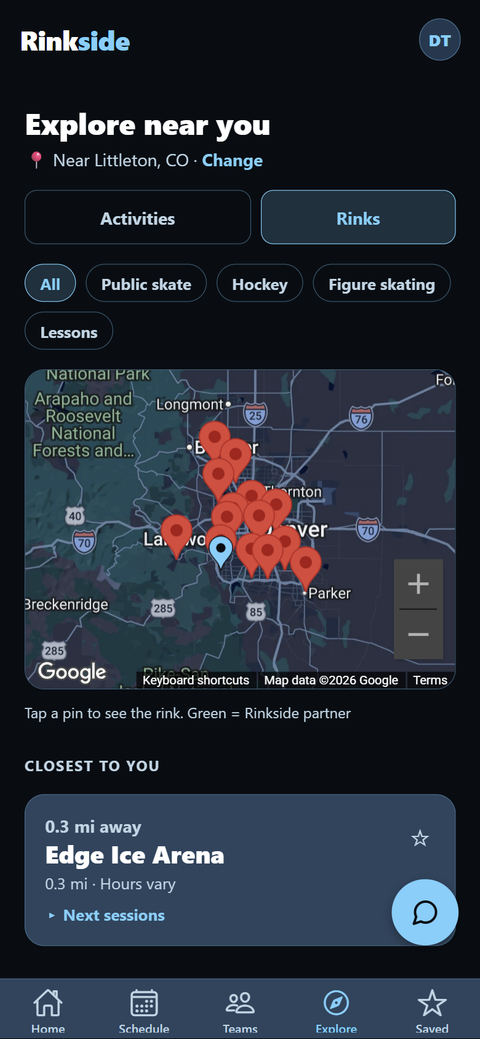
Explore
Lo-fi wireframe
Hi-fi prototype
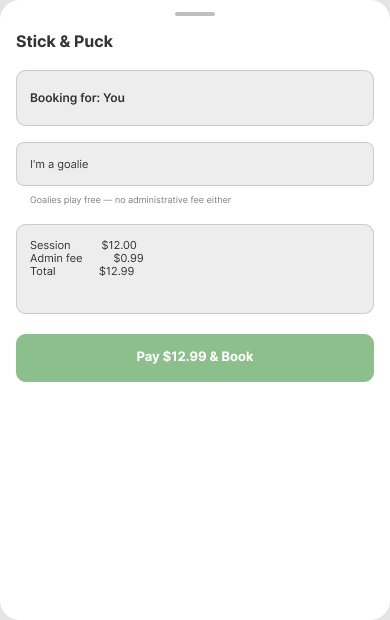
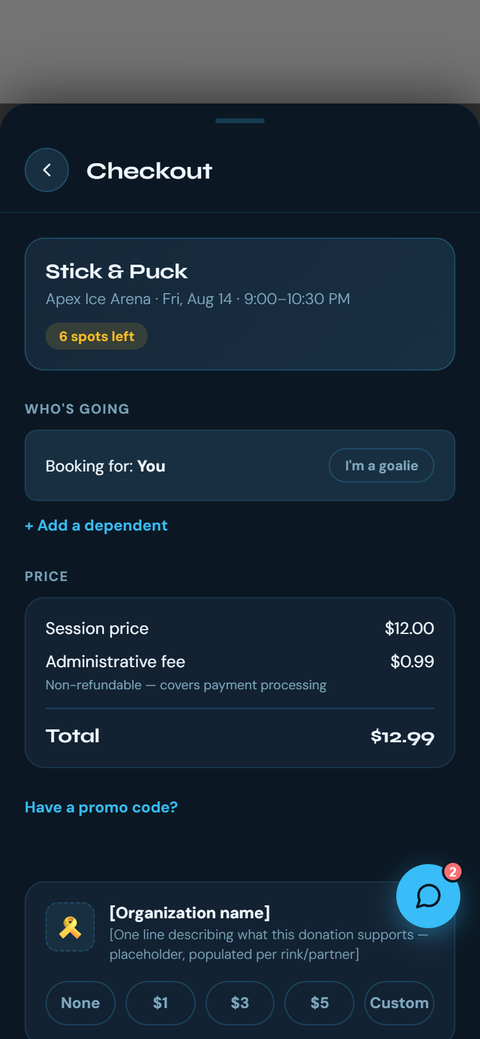
Checkout
Lo-fi wireframe
Hi-fi prototype
The built app, at phone and desktop size, is under Final design.
06Usability testing
In progress
I chose to build a working alpha first and test with the real app instead of a prototype. Two hockey teams are using it now, and I'm collecting their feedback over the next few weeks. I'll add the results here.
The plan
Watching people use it (3–5 people, about 30 minutes each). I give someone a task, like "find out if there's an open session tonight and how many spots are left," and ask them to think out loud while I watch where they hesitate.
A follow-up survey (8–10 people) with a standard usability score, so I can compare rounds.
The tasks check whether the problems from research are actually solved: Can you tell if a session has room within 10 seconds? Do you hit any dead ends? Can you join your team from an invite and answer In or Out? Booking, cancelling, and the goalie fee come later. The alpha sends people to the rink's own sign-up page until rinks join (see Final design).
Feedback from the alpha comes in through the app's built-in feedback form.
Early signal
Before the alpha, two people tried the prototype informally. Both said, separately, that it was too dark. One also said it was "easy to use, very clear to navigate." Two people saying the same thing unprompted was enough for me to act on (see Iterations).
07Iterations
So far, these changes came from research findings, an accessibility audit, and early feedback. Changes from the alpha testing will be added after it wraps up.
Checkout: goalies play free
The first checkout wireframe treated everyone the same. I rebuilt it with an "I'm a goalie" toggle that waives the fee, and separate spot counts for skaters and goalies.
Why: research showed rinks let goalies skate free and track them separately.
Check-in: from "show at the door" to self check-in
I planned a confirmation screen to show staff at the door. I changed it to a check-in button in the app.
Why: none of the four real check-in processes I observed involved showing a phone.
Notifications: let people choose
I planned text messages only. I changed it so each person picks how they hear from the app.
Why: my third parent interview split the preference: two wanted texts, one wanted email.
Theme: from dark-only to three themes
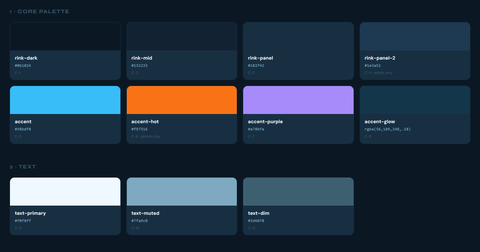
The prototype was dark-only. The alpha ships with Light, Dark, and Warm themes, and each one is checked against WCAG contrast.
Why: both informal testers said it was too dark. Rinks are also bright, and a dark screen is harder to read there.
Text contrast fixed across every screen
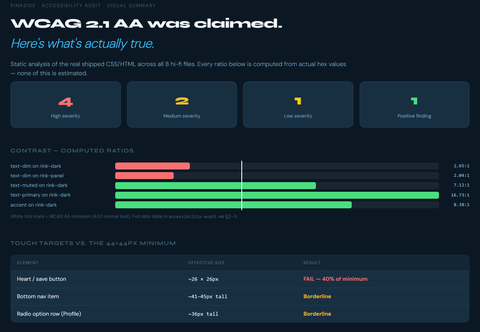
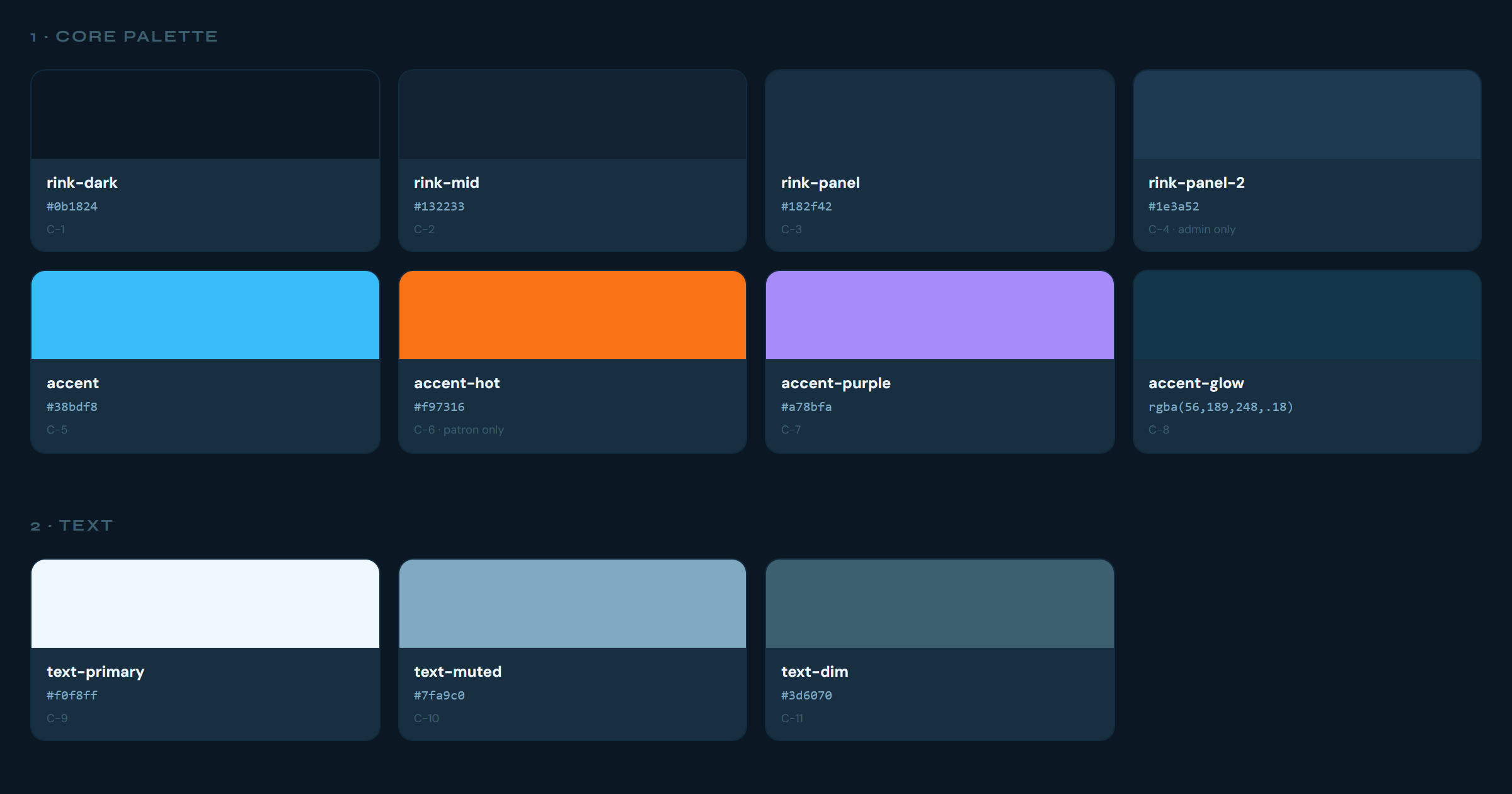
Secondary text went from #3d6070 to #7aa3b8, raising contrast from 2.65:1 to 6.63:1.
Why: my own accessibility audit (next section).
08Accessibility
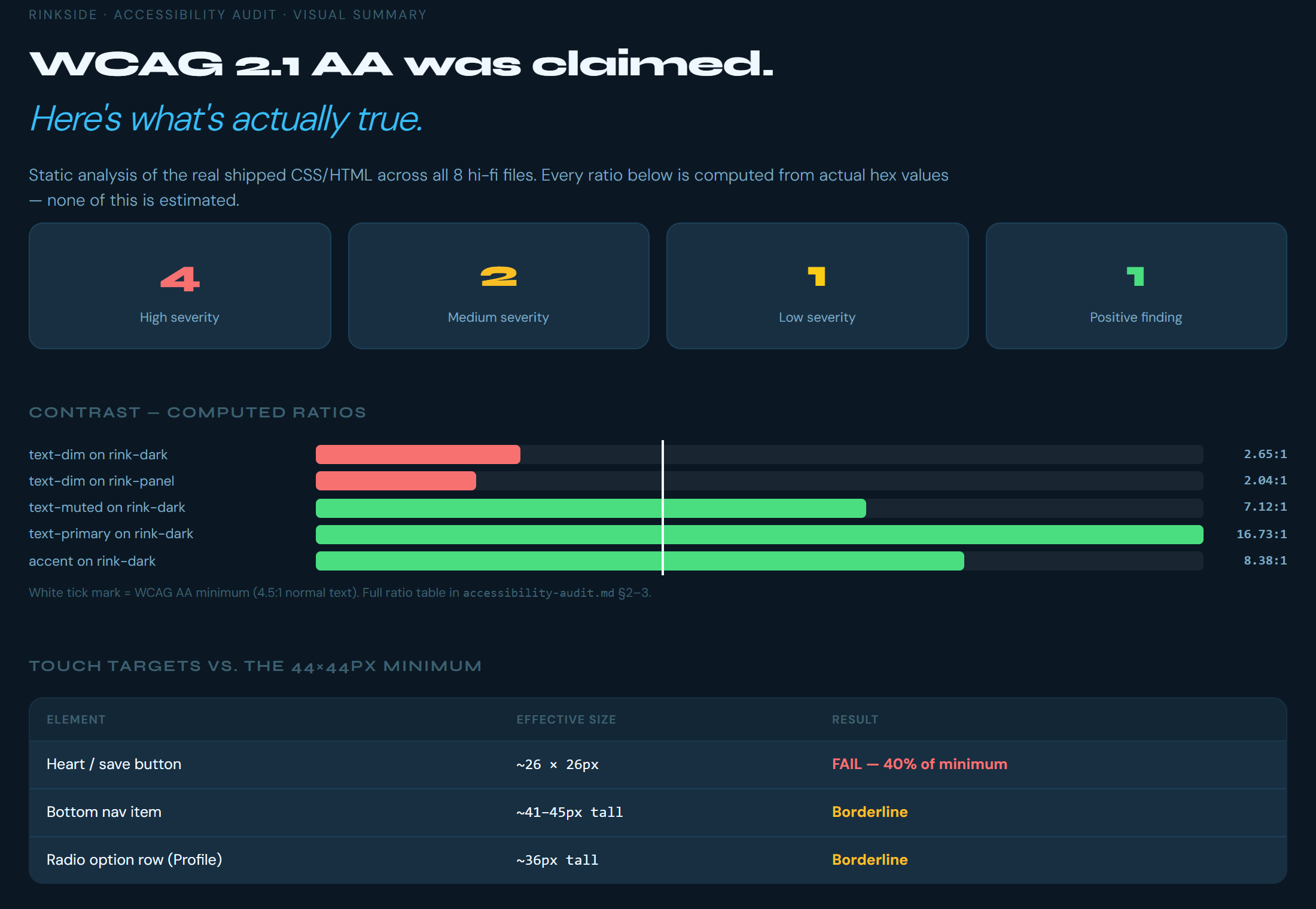
I'd assumed the prototype met WCAG AA. When I actually measured it, it didn't: the audit found four high-severity issues.
The audit. Every ratio computed from the real color values, not estimated. Open full size image
Readable secondary text
Raised the dim text color from 2.65:1 to 6.63:1 contrast.
Helps: people with low vision, and anyone reading their phone under bright rink lights.
Visible keyboard focus
Added a clear focus outline to every control.
Helps: people who navigate with a keyboard or switch device.
Bigger tap targets
The save (heart) button was about 26×26 px, well under the 44×44 px minimum. The audit flagged it for more padding.
Helps: people with limited dexterity, and anyone tapping with gloves on.
In the alpha
Three themes, all checked. Every text color in Light, Dark, and Warm measures at least 4.5:1 on every background. The check also caught a power-play badge at 1.9:1, which I fixed.
Every control has a name. All 117 tappable elements have a role and a label for screen readers, and errors and confirmations like "Link copied" are read out loud.
Big tap targets. Buttons and inputs are at least 48 points tall, and small icon buttons get a bigger tap area.
Text grows with the phone's settings, and team banners grow instead of cutting off text.
No gesture-only actions. The one long-press (reporting a chat message) is also available as a screen reader action.
Helps: people with low vision, people who use VoiceOver or TalkBack, people with limited dexterity, and anyone squinting at their phone under rink lights.
Still to do
All of this comes from reviewing the code, not from testing on a device. Next is a real VoiceOver and TalkBack pass, a check at the largest text size and in landscape, and a color-blindness check on the In / Maybe / Out colors.
09Final design: the alpha
I'm launching Rinkside in four steps, and the alpha is step one. Without partner rinks there's nothing to book or pay for inside the app yet, so step one focuses on what skaters can use today: finding sessions near them and keeping track of their team.
Skater app (now): find sessions near you and run your team. Sign-ups still happen on each rink's own website.
Free founders' version of Rinkside for rinks: partner rinks publish sessions once. In-app booking and payments start here, with a small transaction fee.
Tournaments and associations on both the skater and rink sides.
Premium subscriptions for rinks.
What changed from the prototype
Booking hands off to the rink. The prototype's checkout, fees, waitlist, and refunds wait for step two. In the alpha you tap through to the rink's sign-up page, then add the session to your schedule.
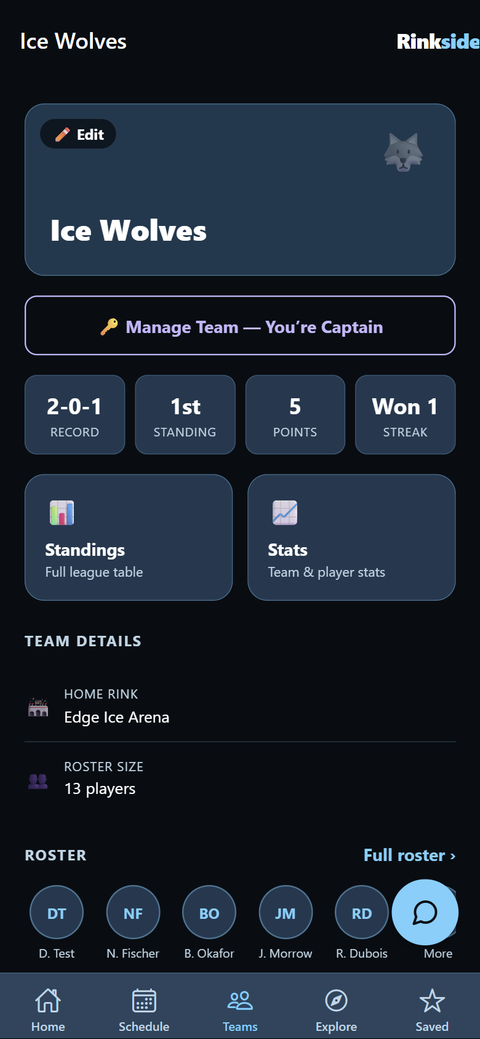
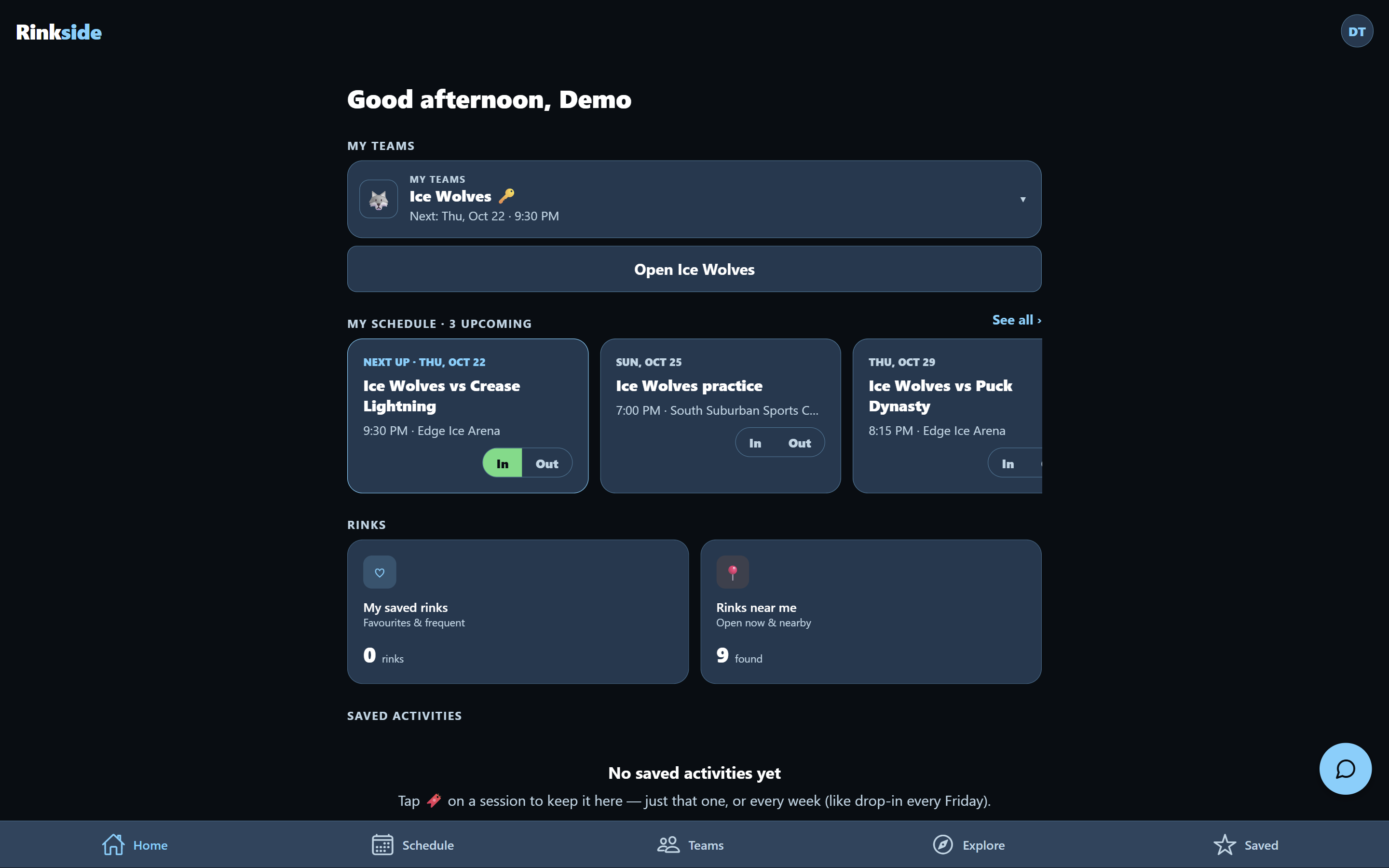
The team side grew. Captains invite teammates with a text link. Players answer In or Out. Schedules import from a league link, calendar, or screenshot (read by the Claude API). Scores, standings, and stats fill in from the league's site, and players get an alert when the league moves a game.
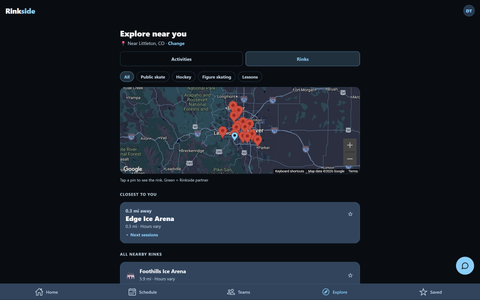
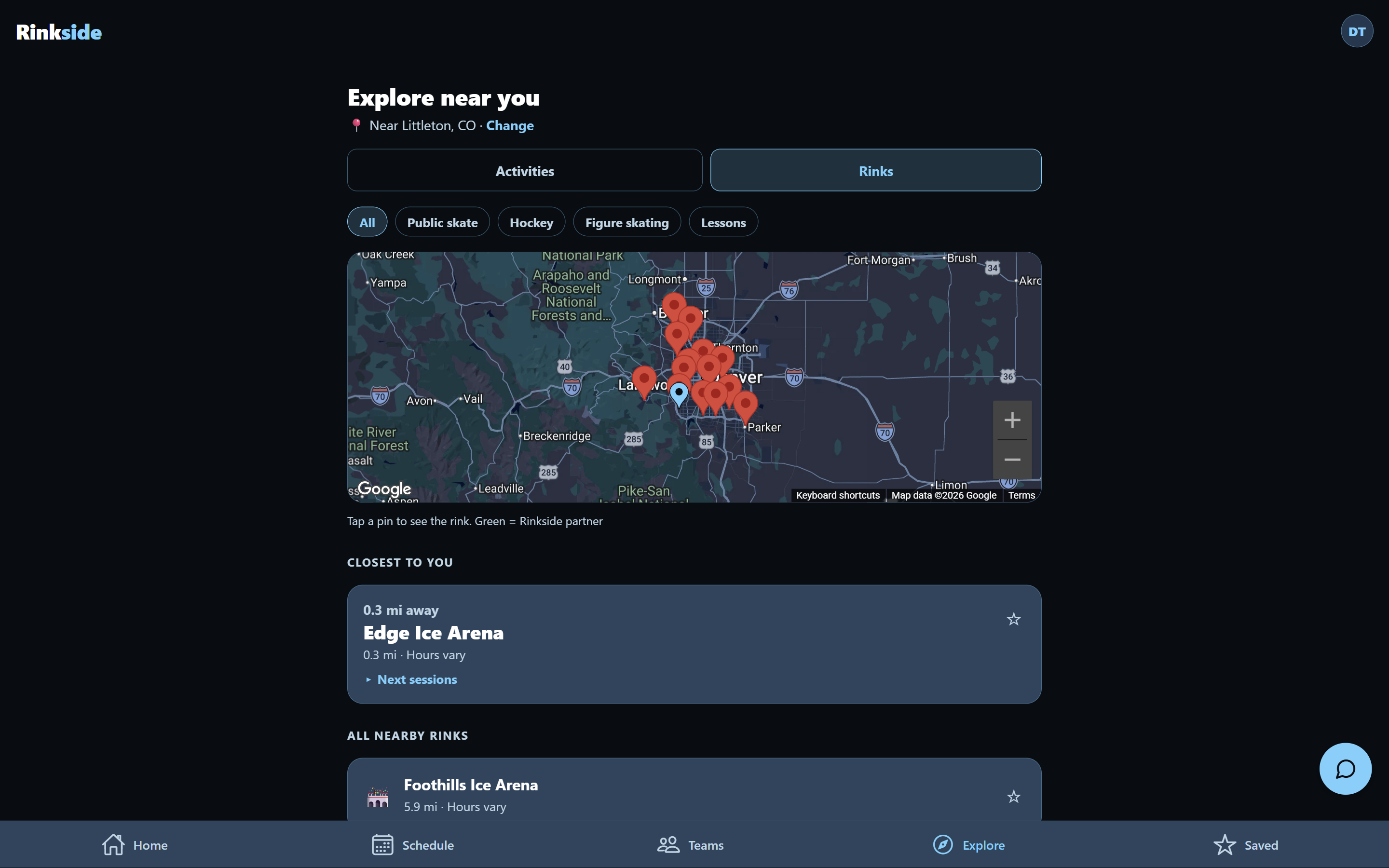
Sessions from 73 rinks, pulled from the rinks' own public calendars and websites.
Three themes (Light, Dark, Warm), in response to "too dark."
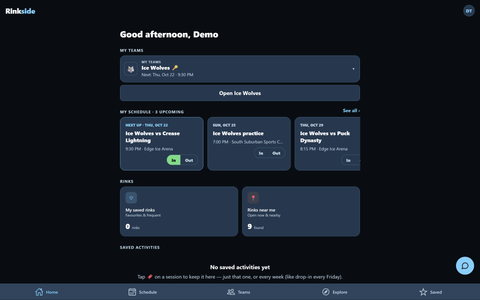
Home. Your team's next game, with In / Out right there.
Explore. Rinks and sessions near you, on a map or a list.
Team. Record, standings, and stats fill in on their own.
On a computer
The same app runs on the web, in a centered column on wide screens.
Every nearby session in one list or map, because people want "movie tickets for ice."
In / Out right on the Home screen, because captains spend their week chasing replies.
Schedules imported, not typed, because a volunteer retyping the league schedule is where teams fall apart.
Alerts when the league changes a game, because stale times in team apps were a real frustration.
One Explore tab with a toggle, because separate tabs confused people.
Booking stays on the rink's site for now, so I'm not showing prices or spots I can't guarantee until rinks are partners.
Back to the problems
Can't see what's available: Explore shows sessions from 73 rinks in one place, on a map or a list. Live spot counts need partner rinks (step two).
No single source of truth: one list across rinks, pulled from their own calendars until rinks publish directly through Rinkside.
Casual skaters left out: anyone can find public skate, stick & puck, and drop-in near them without joining anything. Booking without a membership comes with in-app booking in step two.
Schedules depend on a volunteer: import once from a link or screenshot, and scores and standings fill in on their own.
Design system
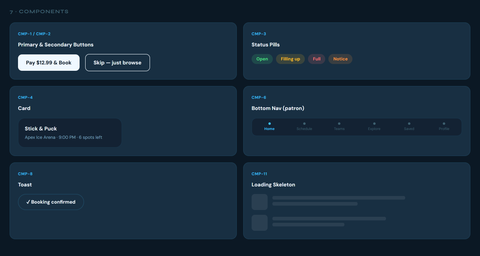
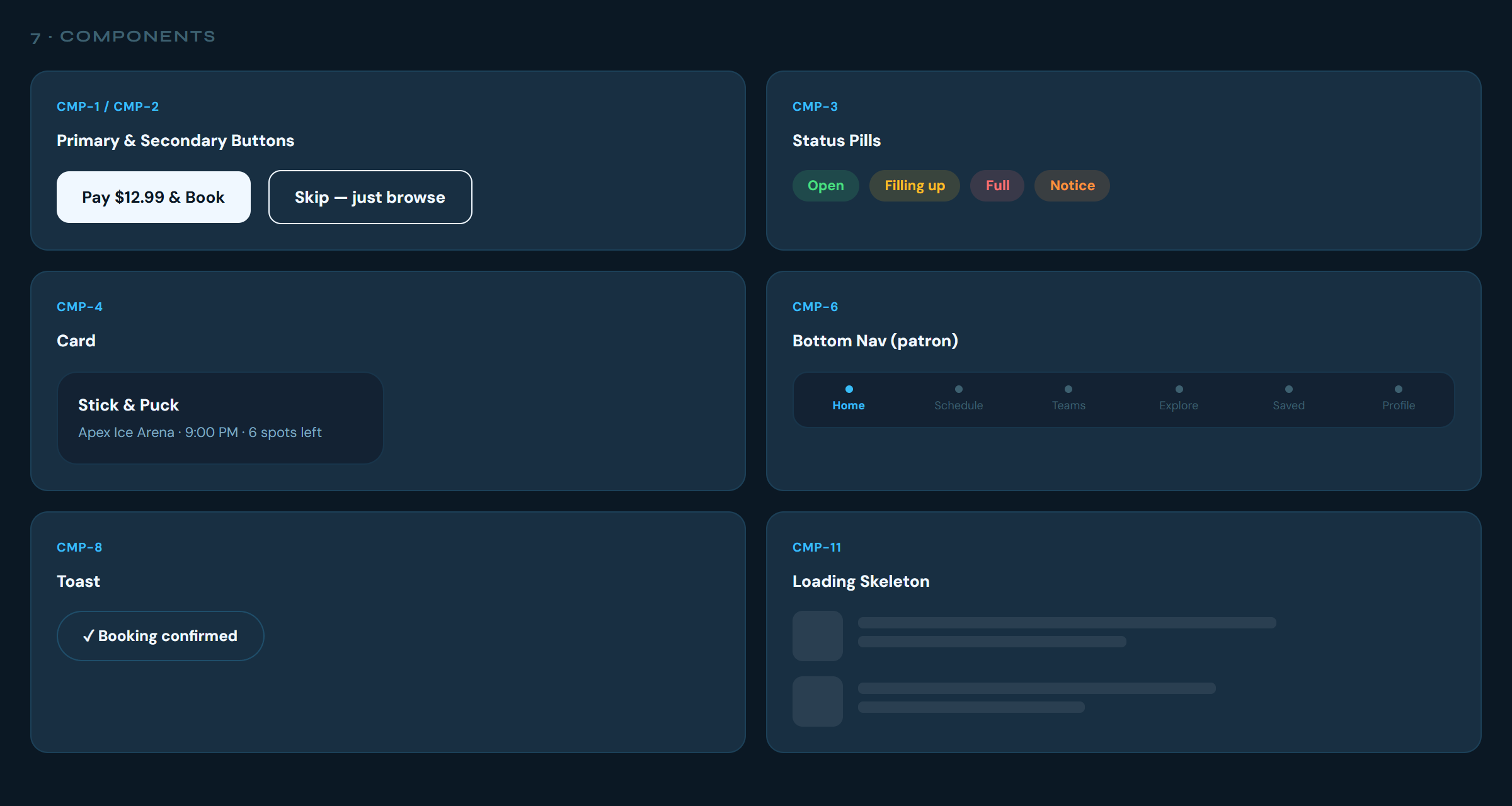
The prototype's tokens and components became the starting point for the app's three themes.
Research can overturn your own assumptions. I was sure check-in meant showing a phone at the door. None of the four real check-ins I watched worked that way.
Rink staff and players describe the same problem in completely different words.
Friction keeps newcomers out much more than it bothers regulars.
What surprised me
Parents are already doing this job by hand, copying schedules between apps.
My own prototype failed my accessibility check. I'd assumed it passed.
I misread one interview: what I took as a request was really a complaint, and it flipped a finding.
What I'd do differently
Test with users before starting the build. I started engineering alongside testing to get to a real alpha sooner, and I'd lock the design first next time.
Base every persona on evidence from the start.
What's next
Finish alpha testing with the two teams and add the results here.
Run the VoiceOver, TalkBack, and color-blindness checks on real devices.
Step two: bring rinks on board with Rinkside for rinks, and turn on in-app booking.
 Aaron Beaudoin